


Mileage Tracker & Log - MileIQ
4.629.72K Reviews
App Specs
- Version
- 5.36.0.10000448
- Updated On
- License
- Free
- Downloads
- 1,000,000+
- Developer
- MileIQ
- Categories
- Finance
- Platform
- Android, iOS
Screenshots
 Analysis by AppCompare
Automatic mileage logging sounds like the sort of convenience you appreciate most after a long day: you arrive, park, and don’t have to reconstruct every stop from memory. That is the appeal of Mileage Tracker & Log - MileIQ, a finance app from MileIQ built around recognizing drives and helping you sort them later. I think it is most useful for people whose work involves regular travel, but its lasting value depends on whether reviewing trips becomes an easy habit rather than another task you put off.
Why the first week feels promising
In the first few days, automatic trip detection can make mileage tracking feel dramatically simpler than opening a notes app before and after every journey. You can focus on driving, then classify trips once they appear. That removes one common point of failure: forgetting to record a drive when you are busy, tired, or making several stops in a row.
The app is free to download, is rated for Everyone, and supports Android 6.0 and later. It has a 4.6 average from around 70,000 ratings, and more than a million installs. Those figures suggest that it is an established option, though they do not tell you whether its routine will suit your particular workday. Its current version is 5.28.0.10000045, and in-app purchases range from $5.99 to $139.99 per item, so it is worth checking the plan details in the app before relying on it for a high-volume driving routine.
Where the habit earns its keep
The real test comes after the novelty wears off. If you make repeat business journeys, drive to appointments, or visit several client sites in a day, a regular review can turn a pile of detected trips into a useful record. I would classify drives while the details are still fresh, rather than waiting until the end of the month. A brief check after parking can help you remember whether a stop was personal, work-related, or part of a mixed day.
That workflow matters because automatic detection is a starting point, not a substitute for your judgement. The app can identify a drive, but you still need to decide how it should be categorized. For someone who drives only occasionally for work, a simple manual log might be less effort than maintaining another app. For someone with frequent trips, the time saved by avoiding manual start-and-stop logging can add up.
When it suits your working day
I can see MileIQ fitting a consultant who drives between clients, a contractor visiting different job sites, or a small-business owner making errands between meetings. Picture a day with a morning appointment, a supply stop, lunch at home, and an afternoon visit. Instead of trying to remember each leg later, you can review the detected drives and mark the work journeys while the day is still clear in your mind. That small timing choice is one of the most practical ways to keep the log useful.
It is less compelling if you rarely drive for business, share driving duties and need to distinguish who made each trip, or strongly prefer not to have a location-tracking app operating in the background. In those cases, a paper log, spreadsheet, or manual mileage tracker may feel more comfortable, even if it asks you to enter more information yourself.
Worth Reading Before You Choose

EA SPORTS FC Mobile 26 Is a Bigger Football Game, but It Takes Time

Flipboard Shows What News Apps Must Do Beyond the Feed

Switching to Android Auto Means Rethinking Your Driving Routine

Google Calendar Makes a Crowded Week Easier to Manage

Ludo King Makes the Most of the Minutes Between Plans

Baby Panda World Brings Quick Play to Modern Phones, but Its Game Library Feels Busy
Get Ready for a Smooth Ride
First off, setting up MileIQ is a breeze. Once you download it, the app guides you through the initial setup. You’ll be asked to fill in some basic info like your name, email, and the purpose of your trips. It’s super straightforward, and before you know it, you’re ready to hit the road.
Automatic Tracking
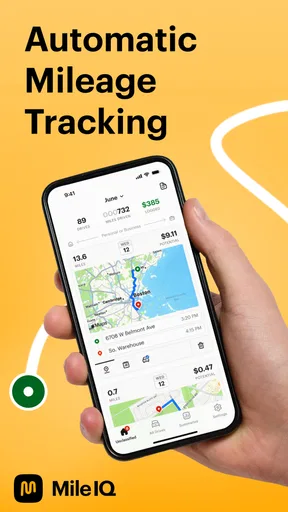
One of the coolest features is the automatic trip detection. You don’t have to remember to start and stop logging each time you hop in the car. The app runs in the background and automatically records your trips. It’s like having a personal assistant who never forgets a thing.
Easy to Use Interface
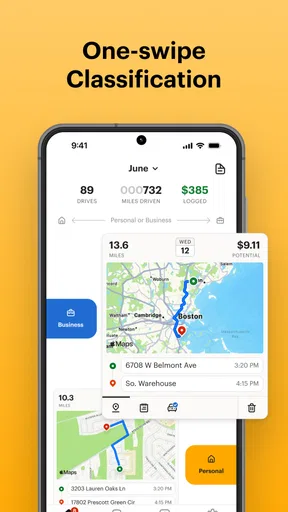
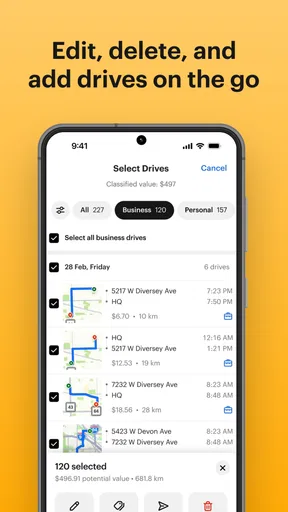
The app interface is clean and intuitive. After a trip, simply swipe left for personal trips and right for business trips. It’s that easy. Plus, it categorizes trips so you don’t have to manually enter all those details. This saves a ton of time, especially if you’re always on the go.
Detailed Reports
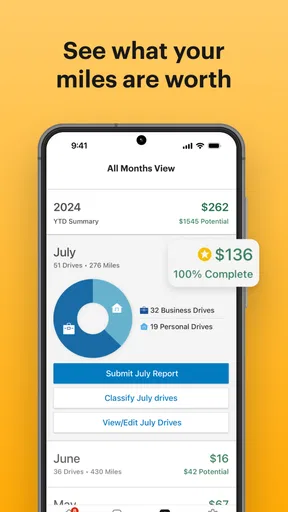
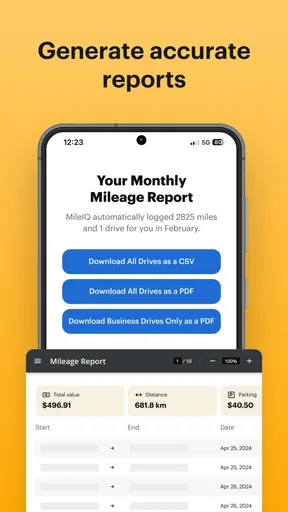
What’s a mileage tracker without comprehensive reports? MileIQ delivers detailed summaries that make tax time a lot less stressful. You can download reports in CSV or PDF formats, making it easy to share with your accountant. The reports are neatly organized, and you can filter them by date or category.
Customizable Settings
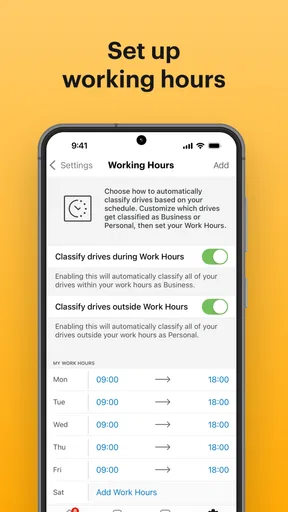
Everyone’s needs are different, and MileIQ gets that. You can customize the app to suit your specific preferences. Whether it’s setting work hours or creating custom trip categories, the app is flexible enough to handle your unique requirements.
Battery and Data Usage
Now, I know what you’re thinking: "Does this app drain my battery?" Surprisingly, it doesn’t. Thanks to its efficient background operations, MileIQ is easy on both your battery and data. I barely noticed any difference in battery life, which is a huge plus.
Security Features
Security is always a concern when using apps that track your location. Rest assured, MileIQ uses encryption to keep your data safe. Your trips and personal information are securely stored, giving you peace of mind.
Subscription Options
While MileIQ offers a free version, it has some limitations on the number of trips you can log each month. For frequent drivers, the premium version is a solid investment. It offers unlimited trip logging, which can be a game-changer if you drive a lot for work.
Support and Community
If you ever run into issues, the support team is responsive and helpful. There’s also a community forum where users share tips and tricks, making it easy to get the most out of the app.
The trade-off behind automatic logging
Automatic detection saves effort, but it does not make every decision for you. A trip can be recognized without its purpose being obvious, and that is where a quick review matters. I would avoid treating an untouched trip list as a finished business record. Build a small routine: check the day’s drives, classify the ones you recognize, and leave yourself a note or reminder for anything unclear rather than guessing later.
Mixed-purpose journeys deserve particular care. If you combine a personal stop with a work outing, decide how you normally document that kind of travel before relying on the log for bookkeeping. A mileage tracker can organize what happened, but your own record-keeping rules determine what belongs in a business total. That distinction is useful whether you export a report for an accountant or simply want a clean personal overview.
Choosing between an app and a manual log
Compared with a spreadsheet or paper notebook, MileIQ’s main advantage is reducing the need to remember to start each entry. The manual approach can be better if you make very few work trips, want complete control over what gets recorded, or dislike background tracking. A calendar can help reconstruct destinations, but it is not the same as a mileage log and may leave gaps between appointments. I would choose based on the friction you actually face: forgetting drives points toward automatic detection; having only a handful of simple trips points toward a basic manual record.
Before making it part of a business process, check how the free option fits your driving volume and review the in-app purchase choices. The free starting point lowers the barrier to trying the workflow, while paid options may make more sense for people with frequent drives. I would not pay simply because the app feels convenient in the first week; first see whether you consistently classify trips and use the reports. Recurring value comes from a record you maintain, not from a feature you rarely open.
Keeping the routine light
One useful approach is to make trip review part of an existing pause in your day, such as when you get home or finish the last appointment. That is more reliable than saving everything for a month-end catch-up, when destinations and reasons can blur together. If your week includes predictable work hours, settings such as work hours and custom categories can help shape the log around your routine. They are most helpful when they reduce repeated decisions; too many categories can create extra sorting rather than clarity.
Also think about what happens when the app misses a drive or records something you did not intend to keep. Automatic tracking should be treated as convenient assistance, not a guarantee that every entry is ready to submit. Review your records before exporting them, and use the CSV or PDF report as a handoff format rather than assuming the file itself validates your classifications. This extra check is especially sensible before tax-related or reimbursement paperwork.
Privacy, phone upkeep, and everyday friction
Location tracking is a personal trade-off. If you are comfortable with an app recognizing journeys in the background, the convenience may be worth it; if you want location access only while actively using an app, a manual log will likely feel better. The original review describes encryption for stored trip information, but that does not remove the separate question of whether continuous trip recognition suits your comfort level. I would decide that before making the app part of every commute.
Battery experience can also vary with a phone’s settings and how it is used, so I would keep an eye on it during the first few days rather than assume every device behaves identically. If detection seems inconsistent, check that the app can operate as intended in the phone’s background settings and review the trip list before relying on it. This is ordinary maintenance for an automatic tracker: less work than recording every drive manually, but not literally zero upkeep.
Who should keep it installed
I would recommend trying MileIQ if you regularly drive for work and have found that memory, scattered notes, or a spreadsheet make mileage records unreliable. Its swipe-based classification and report exports give the routine a clear path from detected drive to organized record. It is also a reasonable fit for someone who wants to separate business and personal travel without stopping to enter each journey by hand.
I would skip it if work driving is rare, background location tracking feels like too much, or you need a workflow in which every trip is entered and checked manually from the outset. It may also frustrate drivers who expect an app to decide the business purpose of every journey without review. A simpler log can be the better tool when your trip volume is low or when careful manual control matters more than convenience.
Does the convenience last?
To wrap it up, Mileage Tracker & Log - MileIQ is a fantastic tool for anyone who needs to keep track of their miles. Its automatic tracking, user-friendly interface, and customizable features make it stand out. Whether you’re an independent contractor, a small business owner, or just someone who drives a lot, this app is worth checking out. So, why not give it a spin? You might just find it’s the missing piece to your mileage tracking puzzle.
My more measured recommendation is to judge it by the routine it creates after the first few drives. If you can review trips regularly, correct the categories, and make useful reports when needed, it can earn a lasting place on your phone. If you stop checking the log, the automatic part alone will not make the record dependable. That is the central trade-off: less effort at the moment of driving, balanced by a little attention afterward.
Pros
- Automatic trip detection saves time.
- Accurate mileage recording for tax purposes.
- Easy-to-use interface with intuitive design.
- Syncs data across multiple devices seamlessly.
- Provides detailed reports for business expenses.
Cons
- Limited free version with few features.
- Requires GPS; drains battery quickly.
- Occasional syncing issues reported.
- Subscription can be expensive for some.
- No advanced customization options.
FAQs for Mileage Tracker & Log - MileIQ
What is MileIQ and how does it work?
MileIQ is a mileage tracking app designed to automatically log and categorize your drives for business purposes. It uses your phone's GPS to detect when you're driving, then records the trip details. Users can categorize their trips as business or personal with a simple swipe, making it convenient for tracking mileage for tax deductions or reimbursements.
Is MileIQ available on both Android and iOS devices?
Yes, MileIQ is available for both Android and iOS devices. You can download it from the Google Play Store for Android or the Apple App Store for iOS. The app provides a seamless user experience across platforms, allowing users to track mileage efficiently on their preferred device.
How accurate is MileIQ in tracking mileage?
MileIQ is highly accurate in tracking mileage, as it leverages your phone’s GPS to record trips. However, accuracy can be affected by factors such as GPS signal strength, phone settings, and location permissions. For optimal performance, ensure your phone’s GPS is enabled and the app has the necessary permissions to operate in the background.
Does MileIQ offer any subscription plans?
Yes, MileIQ offers both a free and a premium subscription plan. The free version allows users to log up to 40 drives per month, while the premium version offers unlimited drive logging. The premium plan also includes additional features such as advanced reporting and more detailed trip categorization options.
How secure is my data with MileIQ?
MileIQ takes data security seriously, employing encryption protocols to protect your information. Your data is stored securely in the cloud, ensuring it is accessible only to you. The app complies with privacy regulations, and users have control over their data, including the ability to export or delete it as needed.


